📘 Day 29 (2025.07.25.FRI) - 하드 디스크 확장, Elasticsearch 설치 및 Python 연동
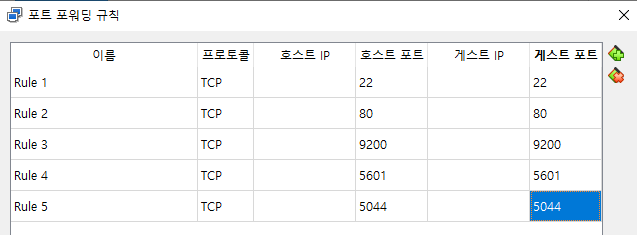
💾 ST_ELK(ubuntu, NAT) 개요 및 포트 포워딩
sudo apt update
sudo apt upgrade
(완료 후 스냅샷 걸기! - init 1)
sudo apt upgrade
(완료 후 스냅샷 걸기! - init 1)
- Elasticsearch 웹사이트 - Management - Index Management에서 체크 후 복사
- 데이터가 index에 쌓임(= 데이터베이스를 만들고 테이블을 만들고 하는 것)
- Discover에서 데이터가 멈추면 보이지 않음
- Kibana - Index Patterns에서 만들어줌 - Discover 들어가면 만들어져 있음
- ELK 설치 방법 -
elasticsearch - 온프레미스 다운로드 - apt-get - Install from the APT repository 명령어로 설치
💽 하드 디스크 확장하기 (용량 늘리기)
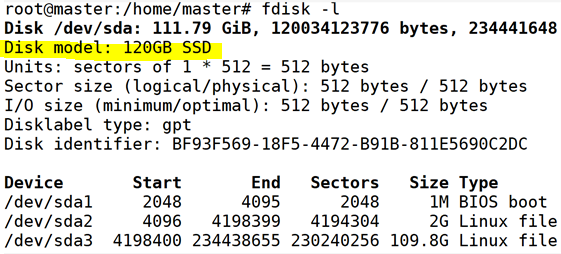
- 192.168.0.129 - 하드 디스크 1개(120GB, fdisk -l)
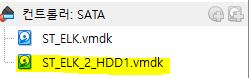
- sda는 50GB, 여기에 50GB 추가하여 용량 확장
- 가급적 로그 삭제는 자제 (문제 발생 시 확인 필요)
- 처음부터 달아 놓아야 사용하기 편함
sudo passwd root - su
fdisk -l
fdisk /dev/sdb - n, p, w (파티션 생성)
mkfs.ext4 /dev/sdb1
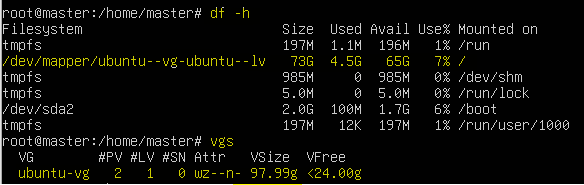
vgs (여유 공간 확인)
pvcreate /dev/sdb1 (예)
vgextend /dev/ubuntu-vg /dev/sdb1 (예)
lvextend -L +50G /dev/ubuntu-vg/ubuntu-lv
resize2fs /dev/ubuntu-vg/ubuntu-lv
df -h
fdisk -l
fdisk /dev/sdb - n, p, w (파티션 생성)
mkfs.ext4 /dev/sdb1
vgs (여유 공간 확인)
pvcreate /dev/sdb1 (예)
vgextend /dev/ubuntu-vg /dev/sdb1 (예)
lvextend -L +50G /dev/ubuntu-vg/ubuntu-lv
resize2fs /dev/ubuntu-vg/ubuntu-lv
df -h
📚 Elasticsearch 설치 및 기본 개념
curl -fsSL https://artifacts.elastic.co/GPG-KEY-elasticsearch | sudo gpg --dearmor -o /usr/share/keyrings/elastic.gpg
echo "deb [signed-by=/usr/share/keyrings/elastic.gpg] https://artifacts.elastic.co/packages/7.x/apt stable main" | sudo tee -a /etc/apt/sources.list.d/elastic-7.x.list
sudo apt update
sudo apt -y install elasticsearch
systemctl start elasticsearch
curl http://127.0.0.1:9200 # 정상 작동 확인
echo "deb [signed-by=/usr/share/keyrings/elastic.gpg] https://artifacts.elastic.co/packages/7.x/apt stable main" | sudo tee -a /etc/apt/sources.list.d/elastic-7.x.list
sudo apt update
sudo apt -y install elasticsearch
systemctl start elasticsearch
curl http://127.0.0.1:9200 # 정상 작동 확인
엘라스틱서치 주요 개념:
- Index - 데이터베이스 역할
- Document - 저장되는 JSON 데이터 한 건
- Type - 논리적 분류
- Field - Document의 키
- Mapping - 데이터 구조 정의
🛠️ Elasticsearch 인덱스 생성 및 문서 CRUD
curl -X PUT "localhost:9200/my_index"
curl -X PUT "http://127.0.0.1:9200/my_index/doc01/1" -H "Content-Type: application/json" -d '{
"subject": "Test Post No.1",
"description": "This is the initial post",
"content": "This is the test message for using Elasticsearch."
}'
curl -X POST "localhost:9200/my_index/_doc/1" -H "Content-Type: application/json" -d '{
"title": "엘라스틱서치 입문",
"date": "2025-07-25",
"views": 10
}'
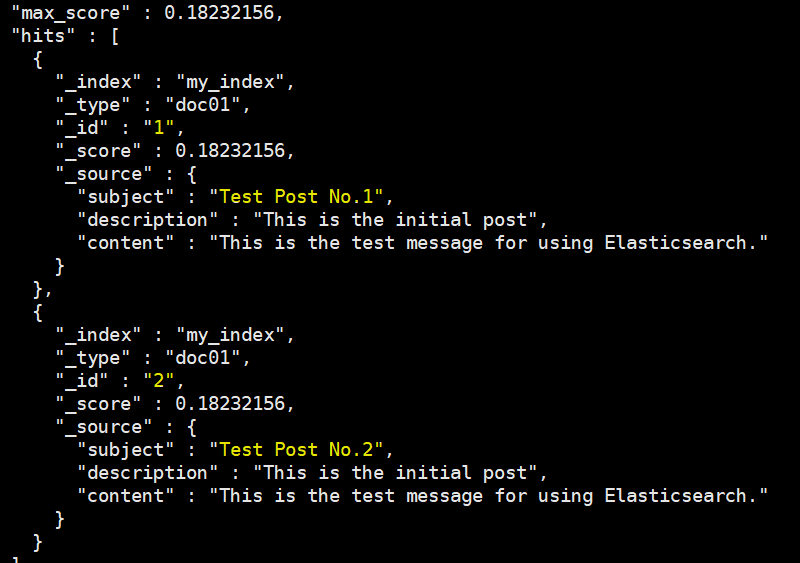
curl -X GET "localhost:9200/my_index/_search" -H "Content-Type: application/json" -d '{
"query": {
"match": { "title": "입문" }
}
}'
curl -X PUT "http://127.0.0.1:9200/my_index/doc01/1" -H "Content-Type: application/json" -d '{
"subject": "Test Post No.1",
"description": "This is the initial post",
"content": "This is the test message for using Elasticsearch."
}'
curl -X POST "localhost:9200/my_index/_doc/1" -H "Content-Type: application/json" -d '{
"title": "엘라스틱서치 입문",
"date": "2025-07-25",
"views": 10
}'
curl -X GET "localhost:9200/my_index/_search" -H "Content-Type: application/json" -d '{
"query": {
"match": { "title": "입문" }
}
}'

🐍 Python과 Elasticsearch 연동
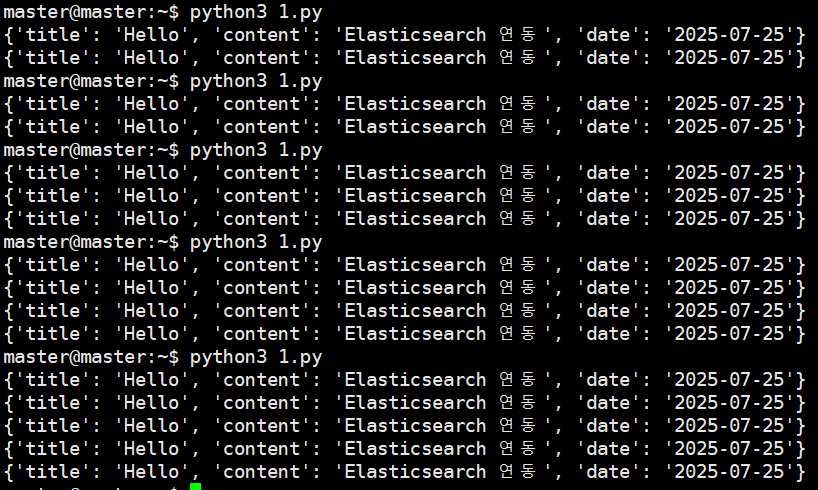
sudo apt -y install python3-pip
pip install elasticsearch
from elasticsearch import Elasticsearch
es = Elasticsearch(
"http://localhost:9200",
basic_auth=("elastic", "123456")
)
index = "st"
if not es.indices.exists(index=index):
es.indices.create(index=index)
es.index(index=index, body={"title": "Hello", "content": "Elasticsearch 연동", "date": "2025-07-25"})
res = es.search(index=index, body={"query": {"match": {"content": "연동"}}})
for doc in res['hits']['hits']:
print(doc['_source'])
pip install elasticsearch
from elasticsearch import Elasticsearch
es = Elasticsearch(
"http://localhost:9200",
basic_auth=("elastic", "123456")
)
index = "st"
if not es.indices.exists(index=index):
es.indices.create(index=index)
es.index(index=index, body={"title": "Hello", "content": "Elasticsearch 연동", "date": "2025-07-25"})
res = es.search(index=index, body={"query": {"match": {"content": "연동"}}})
for doc in res['hits']['hits']:
print(doc['_source'])