📘 Day 3 - UTM 방화벽
🌐 GNS 라우팅 구성
두 개의 라우터(R1, R2)를 Serial 인터페이스로 연결하고 RIP v2를 이용해 네트워크 간 통신을 구성한다.
🧭 R1 한방 설정 (ATTACK)
config t
hostname ATTACK
interface FastEthernet0/0
ip address 100.100.100.254 255.255.255.0
no shutdown
exit
interface Serial1/0
ip address 1.1.1.1 255.255.255.248
no shutdown
exit
router rip
version 2
network 100.100.100.0
network 1.1.1.0
exit
exit
show ip protocols
show ip route
hostname ATTACK
interface FastEthernet0/0
ip address 100.100.100.254 255.255.255.0
no shutdown
exit
interface Serial1/0
ip address 1.1.1.1 255.255.255.248
no shutdown
exit
router rip
version 2
network 100.100.100.0
network 1.1.1.0
exit
exit
show ip protocols
show ip route
🖥️ 연결 확인 (PC1)
PC1> show ip
PC1> ip 100.100.100.1 255.255.255.0 100.100.100.254
PC1> ping 100.100.100.254 -c 1000
PC1> ip 100.100.100.1 255.255.255.0 100.100.100.254
PC1> ping 100.100.100.254 -c 1000
🔗 라우터 간 Serial 연결
R1 ↔ R2를 Serial 인터페이스로 연결
🧭 R2 한방 설정 (WOOSUK)
config t
hostname WOOSUK
interface FastEthernet0/0
ip address 210.93.6.254 255.255.255.0
no shutdown
exit
interface Serial1/0
ip address 1.1.1.2 255.255.255.248
no shutdown
exit
router rip
version 2
network 210.93.6.0
network 1.1.1.0
exit
exit
show ip protocols
show ip route
hostname WOOSUK
interface FastEthernet0/0
ip address 210.93.6.254 255.255.255.0
no shutdown
exit
interface Serial1/0
ip address 1.1.1.2 255.255.255.248
no shutdown
exit
router rip
version 2
network 210.93.6.0
network 1.1.1.0
exit
exit
show ip protocols
show ip route
📡 전체 네트워크 연결 확인
PC1> ping 100.100.100.254
PC1> ping 1.1.1.1
PC1> ping 1.1.1.2
PC1> ping 210.93.6.254
🎯 미션
- PC1 → PC2 연결하기
- PC2 → PC1 연결하기
🖥️ PC2 DHCP 설정
PC2> dhcp
IP : 192.168.0.1 /24
GW : 192.168.0.254
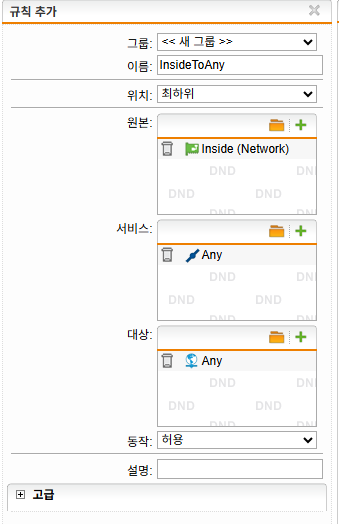
🛡️ UTM 방화벽 설정
UTM에서 방화벽 정책 생성
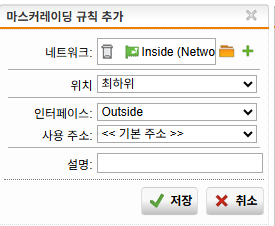
🔄 NAT 설정 (Masquerading)
라우터는 PC2의 내부 IP를 알 수 없기 때문에 NAT(Masquerading) 설정이 필요하다.
✅ 최종 연결 확인
PC2> ping 100.100.100.1