📘 Day 5 - 이메일 패킷 분석
📝 시험 문제
10. 아래 시험파일을 다운로드 받은 후 이메일 패킷을 찾고 이메일 내용은 무엇인지 쓰시오.
⇒ Your score 100
🎯 실습 목표
- PC1 → PC3 간 Ping 통신 구성
- 스위치 포트 미러링을 통해 이메일 패킷 캡처
🌐 GNS 환경 구성
- GNS 프로젝트 생성: 20251121005
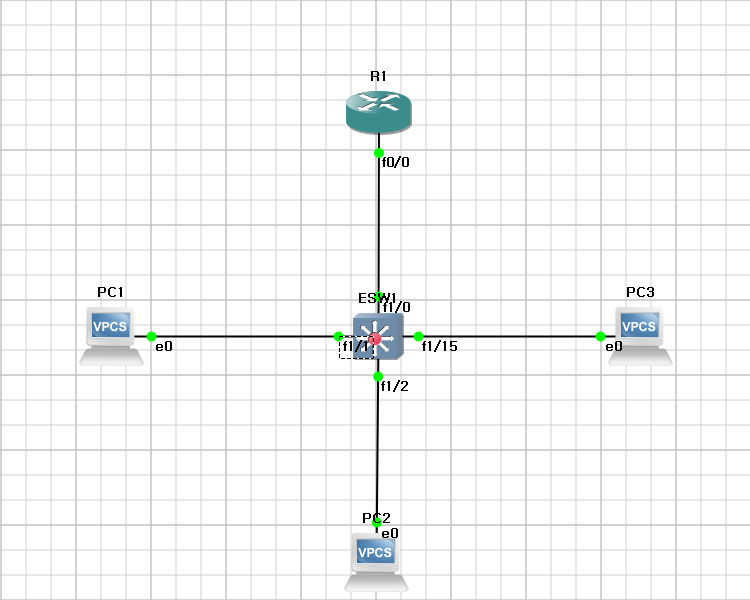
🧭 R1 DHCP 설정
configure terminal
interface fastEthernet0/0
ip address 210.93.6.254 255.255.255.0
no shutdown
exit
ip dhcp excluded-address 210.93.6.1 210.93.6.10
ip dhcp pool WOOSUK
network 210.93.6.0 255.255.255.0
default-router 210.93.6.254
dns-server 210.93.6.35
lease 7
end
write memory
interface fastEthernet0/0
ip address 210.93.6.254 255.255.255.0
no shutdown
exit
ip dhcp excluded-address 210.93.6.1 210.93.6.10
ip dhcp pool WOOSUK
network 210.93.6.0 255.255.255.0
default-router 210.93.6.254
dns-server 210.93.6.35
lease 7
end
write memory
🖥️ PC1 DHCP 설정
PC1> dhcp
DDORA IP : 210.93.6.11/24 GW : 210.93.6.254
DDORA IP : 210.93.6.11/24 GW : 210.93.6.254
🖥️ PC2 DHCP 설정
PC2> dhcp
DDORA IP : 210.93.6.12/24 GW : 210.93.6.254
DDORA IP : 210.93.6.12/24 GW : 210.93.6.254
🖥️ PC3 DHCP 설정
PC3> dhcp
DDORA IP : 210.93.6.13/24 GW : 210.93.6.254
DDORA IP : 210.93.6.13/24 GW : 210.93.6.254
🔎 패킷 캡처 준비 (포트 미러링)
- 스위치 ↔ PC3 패킷을 캡처하기 위해 포트 미러링 설정
- 포트 미러링은 스위치 장비에서만 가능
- FastEthernet 1/1 ~ 1/14 : 관리자 포트
- 캡처용 포트: FastEthernet 1/15
🔀 ESW1 포트 미러링 설정
config t
monitor session 1 source interface fastEthernet 1/1 - 14
monitor session 1 destination interface fastEthernet 1/15
end
show monitor session 1
monitor session 1 source interface fastEthernet 1/1 - 14
monitor session 1 destination interface fastEthernet 1/15
end
show monitor session 1
♻️ 포트 미러링 해제
config t
no monitor session 1
no monitor session 1
✅ 실습 결과
포트 미러링을 통해 이메일 트래픽 패킷을 성공적으로 캡처하였으며, 이메일 내용 분석을 통해 시험 문제를 해결하였다.